
How to Obfuscate Source Code: 8 Techniques, Tools & Best Practices (2026)
Learn to obfuscate source code to boost security. Master this essential skill with our guide. Start protecting your code now!
Index
Protect your business today
Tell us a little about your business and we’ll create a coverage package that fits your needs, with a price you can count on.
Get a QuoteYour source code might be your startup’s most valuable asset, and it’s also one of the hardest things to protect. Unlike a database of customer records, code is visible to anyone who runs your software. Obfuscation is the most widely used technique to defend it: transforming readable logic into something a human can’t easily interpret, while keeping it fully functional for the machine running it. This guide covers exactly how it works, the eight most effective techniques, the tools developers actually use, and why obfuscation should be one layer of a broader security strategy, not your only one.
Why Source Code Is Uniquely Difficult to Protect
Most sensitive data can be protected by restricting who can access it. You lock it behind a password, encrypt it at rest, and control who holds the keys.
Source code doesn’t work that way. Anyone who runs your application can, in principle, inspect what’s happening under the hood through decompilation, disassembly, or simply viewing client-side JavaScript. Access controls can’t fully solve this problem.
That’s where obfuscation comes in.
Obfuscation vs. Encryption: What’s the Difference?
These two terms are often used interchangeably, but they’re not the same thing:
- Encryption makes data completely unreadable until a decryption key is applied. It’s ideal for data at rest or in transit, but adds overhead to runtime processes.
- Obfuscation keeps code machine-executable while making it extremely difficult for a human to read or understand. There’s no key, just deliberate complexity.
For source code protection, obfuscation is often the right tool: it doesn’t slow your application down and it doesn’t require any extra steps at runtime.
Why Tech Startups Have the Most to Lose
For a funded startup, your codebase may represent more monetizable value than any other asset you own. A competitor who reverse-engineers your proprietary algorithm doesn’t need to hire the engineers who wrote it. A cybercriminal who can read your authentication logic has a significant head start on breaching your systems. In 2026, with LLMs making code analysis faster than ever, the barrier to reverse engineering is lower than it’s been at any point in history, which makes obfuscation more relevant, not less.
8 Proven Techniques to Obfuscate Source Code
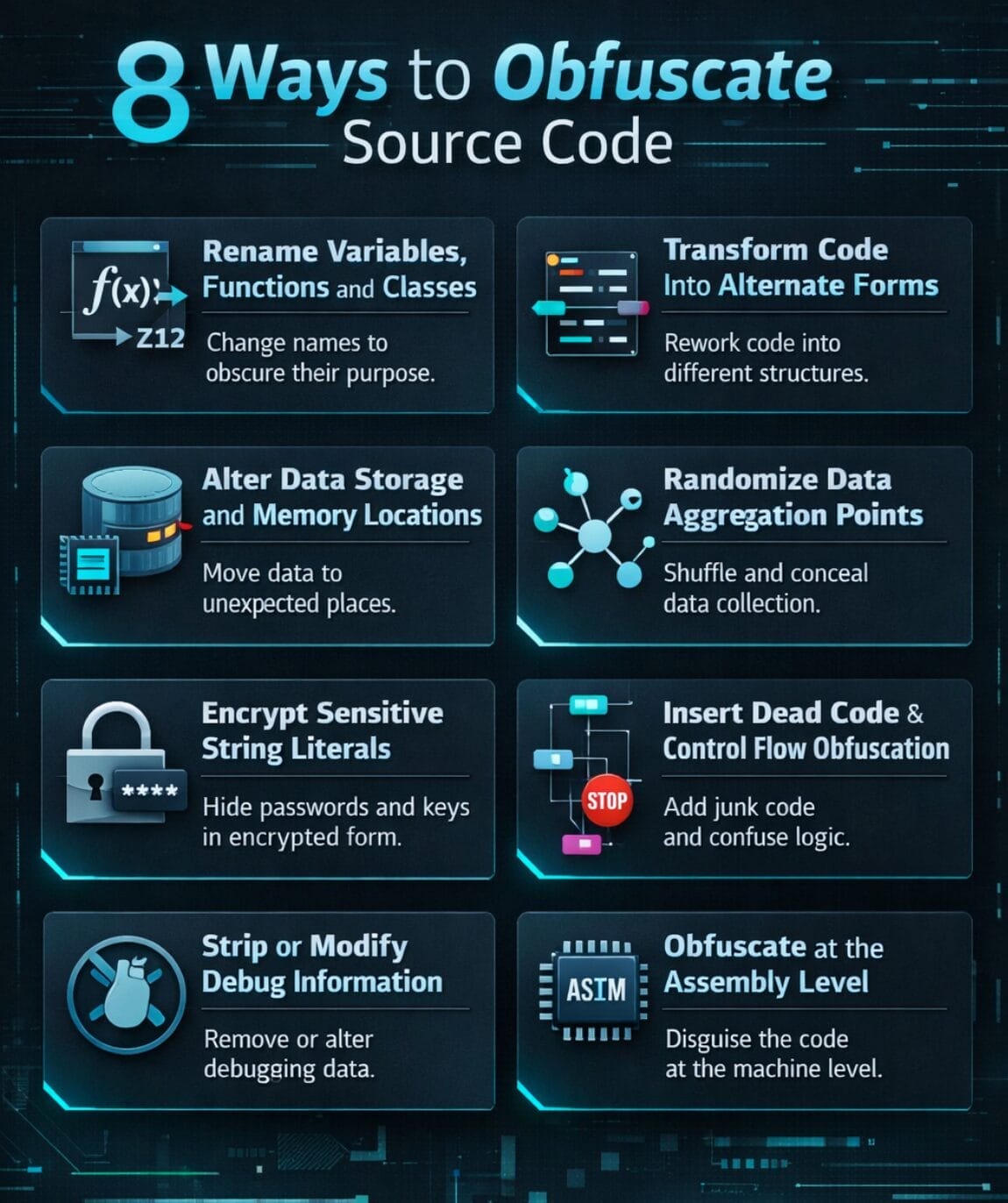
You don’t have to apply all of these at once. Many developers layer several techniques strategically, focusing protection on the most sensitive parts of the codebase. Here’s a breakdown of the most effective methods.
1. Rename Variables, Functions, and Classes
This is the most common and fastest obfuscation technique. Replace meaningful names like calculateMonthlyRevenue() with meaningless strings like a1b2(). Most obfuscation tools do this automatically.
When to use it: Always. This is table stakes for any obfuscated codebase.
2. Transform Code Into Alternate Forms
Convert sections of code into functionally equivalent but harder-to-read forms. Examples include translating logic into bitwise operations, substituting conditional branches with lookup tables, or replacing readable constants with encoded equivalents.
When to use it: For your core business logic, including algorithms, pricing engines, or any proprietary computation.
3. Alter Data Storage and Memory Locations
Vary how and where data is stored by mixing local and global variables, randomizing memory addresses, and splitting data structures into unexpected forms. This disrupts an attacker’s ability to map how data flows through the system.
When to use it: Especially useful in applications that handle sensitive tokens, credentials, or cryptographic material.
4. Randomize Data Aggregation Patterns
Break arrays, collections, and data structures into non-obvious groupings. Split a single array into many sub-arrays, for example, or store related values in apparently unrelated structures. This increases the cost of understanding your data model through static analysis.
5. Encrypt Sensitive String Literals
Hardcoded strings (API keys, internal error messages, URL patterns) are prime targets for attackers doing static analysis. Encrypt individual string literals so they’re decrypted at runtime, leaving blind spots in any static read of the code.
Important note: Don’t encrypt your entire codebase this way, as it will hurt performance. Be selective.
6. Insert Dead Code and Control Flow Obfuscation
Add dummy functions, fake branches, and unreachable code blocks to bury your real logic in noise. Control flow obfuscation makes it hard to trace the actual execution path through a program, a technique particularly effective against automated reverse engineering tools.
When to use it: High-value sections of code where you want to maximize the time cost of analysis.
7. Strip or Modify Debug Information
Debug metadata (line numbers, file names, symbol tables) is a roadmap for reverse engineers. At minimum, strip this information from production builds. You can also replace it with misleading data to add another layer of confusion.
Best practice: Make this part of your CI/CD pipeline so it happens automatically on every production build.
8. Obfuscate at the Assembly Level
For applications where the highest level of protection is warranted, apply obfuscation at the assembly or bytecode level rather than just the source level. Techniques like “jump-in-the-middle” (embedding obfuscated instructions within apparently normal code) can defeat standard disassemblers entirely.
When to use it: Embedded systems, high-security applications, or software distributed in untrusted environments.
Obfuscation Tools Worth Knowing in 2026
Most developers don’t write obfuscation by hand. Here are the tools most commonly used by language:
- JavaScript: JavaScript Obfuscator, Terser (with mangling enabled), webpack’s built-in minification
- Java/Android: ProGuard, R8
- Python: PyArmor, Nuitka (compiles to C extension)
- C/C++: OLLVM (Obfuscator-LLVM), Tigress
- .NET/C#: ConfuserEx, Dotfuscator
- Mobile (iOS): LLVM-based obfuscation, SwiftShield for Swift
Most of these can be integrated directly into your build pipeline so obfuscation happens automatically with every release.
How Often Should You Refresh Your Obfuscation?
Obfuscation isn’t a one-time task. As your codebase evolves and new analysis techniques emerge, previously effective obfuscation can become easier to crack. A practical schedule:
- With every major release: Review which techniques are applied to your highest-value code
- Annually at minimum: Rotate the specific patterns and tools used
- After any security incident: Assume previously applied obfuscation has been mapped and start fresh
Why Obfuscation Alone Isn’t Enough
Obfuscation is a deterrent, not a guarantee. A sufficiently motivated attacker with enough time (or, increasingly, an LLM-assisted analysis pipeline) can work through even well-obfuscated code. It raises the cost of attack; it doesn’t eliminate the risk.
The gaps obfuscation can’t fill:
- It won’t protect you if an insider threat or contractor exfiltrates code directly
- It won’t cover the financial fallout if your IP is stolen and used by a competitor
- It won’t respond to a breach or ransomware attack targeting your infrastructure
- It won’t satisfy a client demanding you make them whole after a code vulnerability causes data loss
That’s why leading tech companies pair technical protections with cyber insurance, Tech Errors & Omissions (E&O) coverage, and commercial crime insurance: policies specifically designed to cover the scenarios obfuscation can’t prevent.
Protect What Your Code Can’t
Embroker specializes in insurance for tech startups and software companies. In minutes, you can get a coverage package that includes cyber liability, Tech E&O, and commercial crime protection, built specifically for how tech businesses operate.
No lengthy forms. No insurance jargon. Coverage that makes sense for your stage and risk profile.
FAQ SECTION
Q: What does it mean to obfuscate source code?
A: Obfuscating source code means deliberately transforming it into a version that is very difficult for humans to read and understand, while remaining fully functional for the computer executing it. It’s a protective technique used to prevent reverse engineering, IP theft, and unauthorized tampering. Unlike encryption, obfuscation doesn’t require a decryption step at runtime, so it doesn’t slow down program performance.
Q: Why do developers obfuscate their code?
A: Developers obfuscate code primarily to protect intellectual property, particularly proprietary algorithms, business logic, and security mechanisms, from being stolen or copied by competitors. It also makes it harder for attackers to find exploitable vulnerabilities through static analysis, and adds a layer of defense when software is deployed in environments that can’t be fully controlled, such as client-side web apps or mobile apps.
Q: What is the difference between obfuscation and encryption?
A: Encryption makes data entirely unreadable without a decryption key, requiring an extra step to restore usability. Obfuscation keeps code machine-executable at all times; it just makes the code extremely hard for a human to interpret. For protecting source code in production, obfuscation is generally preferred because it adds no runtime overhead, while encryption is better suited for protecting data at rest or in transit.
Q: What are the most common source code obfuscation techniques?
A: The most widely used techniques include renaming variables and functions to meaningless strings, inserting dead or dummy code, transforming logic into alternate functional forms (like lookup tables), encrypting string literals, randomizing data structures and memory patterns, stripping or altering debug metadata, and applying control flow obfuscation. Developers typically combine several techniques and focus the strongest protections on their most sensitive code.
Q: What tools are used to obfuscate source code?
A: The tools vary by language. For JavaScript, common choices are JavaScript Obfuscator and webpack with mangling. Java and Android developers often use ProGuard or R8. Python developers use PyArmor or Nuitka. C/C++ codebases can use OLLVM or Tigress. .NET developers commonly rely on ConfuserEx or Dotfuscator. Most of these can be integrated into CI/CD pipelines to automate obfuscation on every production build.
Q: Is code obfuscation legal?
A: Yes, code obfuscation is entirely legal when used on your own software. It is a standard and widely accepted software security practice used by major companies worldwide. The legality can become more complex if obfuscation is used to conceal malware or circumvent license agreements on third-party software, but for protecting your own proprietary code it raises no legal concerns.
Q: Can obfuscated code be reverse engineered?
A: Yes, obfuscation can be defeated with enough time, expertise, and the right tools. It significantly increases the cost and effort of reverse engineering, but does not make it impossible. Modern LLM-based code analysis tools have made automated de-obfuscation easier than in previous years, which is why obfuscation should be treated as one layer of a broader security strategy rather than a complete solution on its own.
Q: Does code obfuscation affect application performance?
A: In most cases, properly implemented obfuscation has minimal impact on runtime performance. Techniques like renaming variables, control flow changes, and dead code insertion add negligible overhead. Selective string encryption at the source level can add a small cost, but broad encryption of the entire codebase would be more impactful, which is why most developers apply encryption selectively to the most sensitive literals only.
Q: What’s the difference between minification and obfuscation?
A: Minification compresses code by removing whitespace, comments, and shortening names to reduce file size; it’s primarily a performance optimization. Obfuscation is a security technique that deliberately restructures and transforms code to make it hard to understand. Minified code can often be pretty-printed back into readable form in seconds, while properly obfuscated code requires substantially more effort to reverse. Many JavaScript tools combine both, but they serve different purposes.
Q: How does code obfuscation protect intellectual property?
A: When software is distributed or deployed, the underlying code can often be accessed through decompilation or disassembly. Obfuscation makes the recovered code extremely difficult to read, interpret, and reuse, effectively protecting the proprietary logic, algorithms, and architectures that represent your company’s competitive advantage. For startups where the codebase is the primary asset, this is a critical layer of IP protection.
Q: Do I still need cyber insurance if I obfuscate my code?
A: Yes. Obfuscation reduces the risk of reverse engineering and IP theft, but it doesn’t protect against all threats. It won’t prevent a ransomware attack that encrypts your systems, a breach caused by an unrelated vulnerability, an insider threat, or liability claims from clients if a software defect causes data loss. Cyber insurance, Tech E&O, and commercial crime coverage address the financial consequences of incidents that technical measures can’t fully prevent.
Q: What kind of insurance do tech startups need to protect their software and IP?
A: Tech startups typically need three core coverages: Cyber Liability Insurance (which covers costs from data breaches and cyberattacks), Tech Errors & Omissions (E&O) Insurance (which protects against claims that your software caused a client financial harm), and Commercial Crime Insurance (which covers IP theft and fraud by employees or external bad actors). Together, these policies cover the scenarios that code obfuscation alone cannot.